
To redact PDFs for a public-records release, start from the approved withholding decisions, apply them to working copies of each file, export separate release copies and reconcile the saved files with the release list. DocHush’s local workflow handles the page preparation; the disclosure officer decides what may be released, and the software does not assign exemptions.
The example below follows a records officer preparing a release packet: a two-page permit record, an email and a supporting attachment. The disclosure officer has approved the inspection findings for publication and identified two personal contact details to withhold; the attachment still needs a decision. The document above follows the permit record through review, removal and the final check.
1. Match each file to its release decision
In this example, the records officer opens Permit-P01.pdf from the agency’s working folder. The original stays in the records system. The release copy will be a separate file.
The permit number P-2026-042 and inspection findings must remain visible. The specified personal phone number must be removed. These instructions come from the disclosure decision, not from the presence of a number on the page.
| Source | Decision for this example | What the reviewer must preserve |
|---|---|---|
| P-01, permit cover | Remove the specified personal phone number | Permit number and findings summary |
| P-01, inspection note | Release the findings | Complete findings and their context |
| P-02, email | Remove the specified private email address, including repeats | The approved message text |
| P-03, attachment | Hold until the outstanding decision is resolved | The original in the records system |
Keep this decision record in the agency’s internal system. DocHush is where those decisions are applied to the pages; it does not assign exemptions or replace the release authorization.
For US federal FOIA, agencies must consider partial disclosure and take reasonable steps to release nonexempt information. Withholding is subject to the applicable exemption and foreseeable-harm or legal-prohibition requirements. State, local and non-US requests follow their own rules. FOIA.gov’s explanation
Confirm the required delivery format before processing. The image-only route below does not retain searchable text, form fields, links, digital signatures or the original accessibility structure. If the request or agency process requires searchable or accessible documents, arrange a reviewed delivery format that meets those requirements first.
2. Review the candidates without losing the findings
Open the two-page Permit-P01.pdf working copy and run Scan. In DocHush’s Review view, the page sits beside the candidate list. Selecting the phone-number candidate takes the reviewer to its location. Read the label and nearby text, compare them with the decision record, then accept the removal. Leave the permit number readable.
This distinction matters on administrative forms. A phone number, a parcel reference and a case number can appear close together. A broad mark across the contact block may also hide a reference that the public needs to understand the record. Adjust the region to cover the approved field and no more.
For P-02, check both the message header and the quoted reply. The same address can occur more than once, but each occurrence still needs the treatment authorized for that passage. Review one file at a time and reconcile it with the packet list before moving on.
DocHush’s detection and review run on the local computer. That gives teams whose records cannot be uploaded a way to keep the working document within their approved environment. Document processing works offline; signing in, buying pages and updates need an internet connection.
3. Include stamps, scans and handwritten additions
A scanned application needs more than a text search. Use local OCR to bring text into detection; the reviewer still sees the page image and checks the proposed regions against it. For a packet that mixes typed records and scanned attachments, follow the scanned PDF workflow page by page.
Inspect stamps, margins, handwritten contact details and anything near a page edge. Add a manual mark for an approved removal that was not suggested automatically. A faint digit left outside a box can remain readable even when the rest of the phone number is covered.
Keep P-03 out of the release set while its decision is unresolved. Neither a clean-looking preview nor a completed scan authorizes disclosure. If the agency requires exemption labels, an index or a particular response format, include those requirements in the release plan and review the completed package against them.
4. Create the approved public copy
The Redact view shows the accepted phone-number region as a black removal while the permit reference and findings remain visible. Yellow highlights in Review are selections for a decision; they are not the outgoing document.
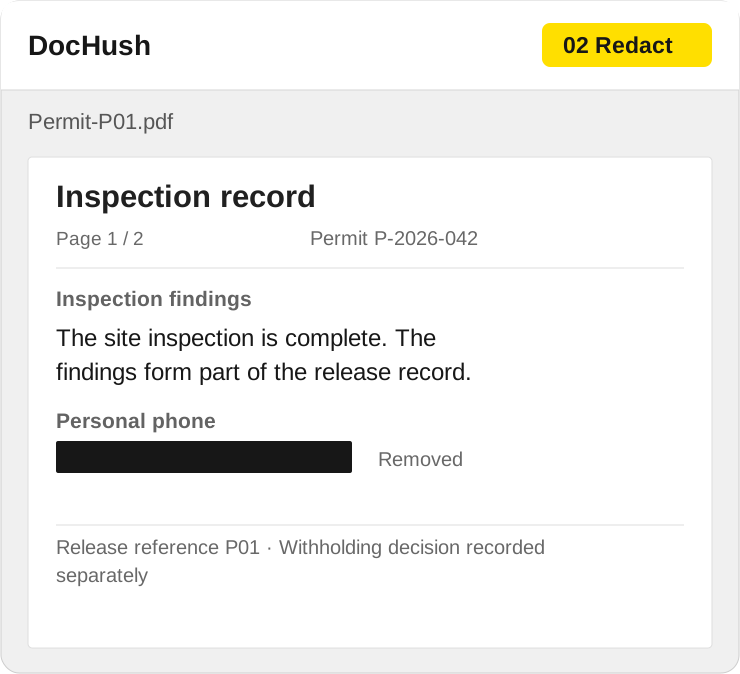
Apply the approved phone removal and preserve the inspection findings needed to understand the public record.
DocHush’s initial export design renders the pages, burns in the approved removals and creates a new, image-only PDF. The outgoing file is built from those resulting page images instead of carrying over the original text layer, comments or embedded attachments. Keep the source record and any separately releasable attachments under their own references.
Any separately releasable attachment needs its own preparation and review. Leaving it out of this PDF does not settle whether it belongs elsewhere in the response.
5. Review the output against the release list
The Verify view focuses attention on the exported copy. The verification workflow reopens the output pages, inspects their integrity and checks the approved removals within a stated scope. Incomplete checks need review; a written file is not enough to establish a finished release.
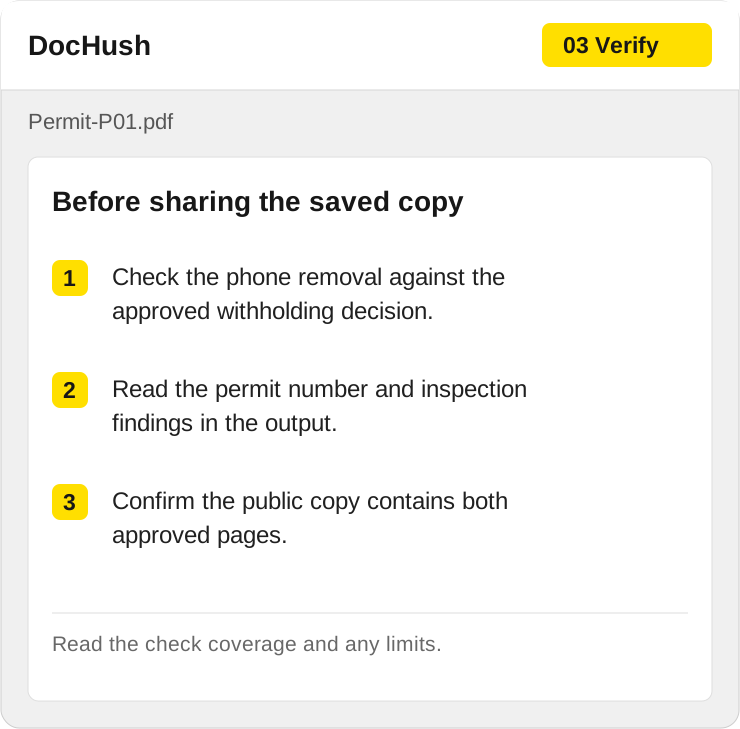
Check each output against its release reference, including the pages and attachments that belong in the package.
For P-01, confirm that the designated phone number is gone, the permit number is still readable, and the inspection findings are complete. Reopen the saved copy and confirm both pages are present. Use a neutral filename such as P-01-public-copy.pdf.
If a phone digit remains visible, a finding is obscured or a page is missing, keep that file out of the delivery folder. Correct the working copy, export again and repeat the page and removal checks. If the decision itself is unclear, return it to the disclosure officer; an extra redaction is not a substitute for a decision.
For an additional inspection, open the free PDF redaction checker and check the saved file for remaining text and hidden data. The PDF stays in the browser. The tool does not apply redactions, perform OCR, read embedded attachment contents or determine which records may be released. Read its coverage and inspect every image-only page visually. The PDF checking guide explains the manual checks.
Before the authorized reviewer approves publication, reconcile the delivery folder with the release list:
- P-01: the two-page public copy, with permit reference and findings intact.
- P-02: the separately reviewed email copy, including its quoted reply.
- P-03: excluded while its disclosure decision remains unresolved.
- Accompanying material: the required response, labels or index, prepared under the agency’s process.
Record the source reference, approved output filename, page count and reviewer/date in the agency’s release record. This connects the decision to an identifiable file when another person publishes it.
6. Check the PDF at the public download link
After authorized publication, download the PDF from the actual public link. Match it to the release record: P-01 must be the two-page approved copy, its permit reference and findings must remain readable, and the designated phone number must be absent. Check the P-02 download separately and confirm P-03 was not included. A matching filename alone does not establish that the right version was published.
If a download differs from the approved copy, notify the release owner and follow the agency’s correction process before treating the handoff as complete. Recheck the replacement at the public link.
Keep the disclosure decision, file preparation and final review connected. The released copy should reflect the approved decision on every page.