
A redacted bank statement is a sharing copy with selected information removed. Start with the bank-issued original, keep it untouched, and confirm what the recipient needs to see and whether they accept a redacted copy. Then use a tool that removes content, save a separate output, and review that saved file before sharing it.
A black rectangle alone is not evidence that the information underneath has been removed.
The steps at a glance
These steps apply in any tool that removes content rather than covering it. The sections below explain each decision with a fictional two-page statement.
- Ask the recipient which pages and fields they need, and whether they accept a redacted copy.
- Work on a copy of the bank-issued PDF and keep the original untouched.
- Mark every occurrence of each value to remove, including the account number in continuation headers, and leave the approved last digits visible.
- Apply the removal, remove hidden information such as metadata and comments, and save a new file.
- Open the saved copy, search for the removed values and read every page before you share it.
Start with the recipient’s requirements
There is no universal list of bank statement fields you can hide for every purpose. A recipient checking income may ask for different information from someone confirming account ownership.
Ask for the required statement period, pages and fields, plus any rules about altered documents. If their instructions are unclear, resolve that before removing information.
What different recipients usually ask for
The table lists common reasons for sharing a statement and the requests that often come with them. It is a starting point for the conversation with your recipient, not a rule: the recipient’s own instructions replace any row here, and some recipients accept no redaction at all.
| Purpose | Typical request, and what to confirm first |
|---|---|
| Rental application to a landlord or letting agent | Visible: your name, the statement period, regular incoming payments and the closing balance. Often removable: individual spending entries, the account number beyond its last digits, an address they already hold. Confirm: whether they accept a copy limited to those fields or need the complete statement. |
| Early affordability check by a lender or broker | Visible: name, period, income entries and balances. Often removable: unrelated transactions and the full account number. Confirm: whether a later stage, such as final underwriting, requires the complete, unredacted statement. |
| Visa or immigration application | Visible: whatever the authority’s document list specifies. Often removable: do not assume any field may be removed. Confirm: whether the authority permits redaction at all; follow its list exactly. |
| Proof of one payment, such as a refund or a dispute | Visible: the transaction, its date and amount, and your name. Often removable: every other transaction, balances and the full account number. Confirm: whether a payment confirmation from the bank would serve instead. |
| Accountant, bookkeeper or auditor working on the period | Visible: typically the complete statement. Often removable: rarely anything. Confirm: whether the bank’s own export or a different period is what they actually need. |
| Court filing or other legal proceeding | Visible or removable: decided by the court’s rules and your lawyer. Confirm: do not decide alone; ask before preparing any copy. |
Whatever the purpose, never remove or alter the figures the recipient relies on, and keep the untouched original so you can prepare a different copy if they ask for more. If the statement is one item in an expense review pack, the financial documents guide shows how to keep each amount traceable across receipts and summaries.
Redacted bank statement example
Consider this entirely fictional two-page example. The hypothetical recipient asks Alex Morgan to keep both pages, the account holder’s name, statement period, balances and transaction amounts visible, show only the final four account digits, and remove the postal address. The account number 9876 5432 1098 is made up for this illustration.
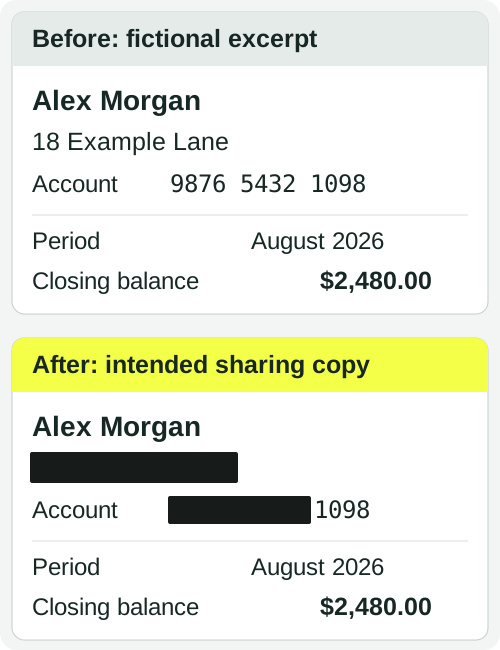
In this example, the recipient needs the name to identify the holder and the last four digits to identify the account. The address and preceding account digits must be removed; the period and balance stay unchanged.
What to keep and what to remove in this example
| Field | Decision under these assumed instructions |
|---|---|
| Account holder | Keep Alex Morgan because the recipient requires the holder’s name. |
| Account number | Remove 9876 5432 and keep 1098. The full original number must not remain in the sharing copy. |
| Postal address | Remove 18 Example Lane because the recipient does not need it. |
| Statement period | Keep August 2026 to identify the requested month. |
| Closing balance | Keep $2,480.00 unchanged, along with the required transaction amounts. |
This is a field-selection illustration, not a bank-issued form or a rule about what any real recipient will accept. The black areas show the intended appearance; the actual PDF needs content removal and saved-file checks.
Do not change figures, dates or transaction descriptions to make the document appear different. Keep an untouched original so you can produce another copy if the recipient requests different information.
Check whether the PDF contains searchable text
Try selecting a line and searching for a visible account-number fragment.
If the text is searchable, a search can help locate repeated information. Still inspect every page: the same identifier may appear with different spacing or in a header.
If you cannot select the text, the page may be a scanned image. Use a tool that can remove image regions. OCR can make scanned text searchable, but recognition depends on the scan: Tesseract’s documentation notes that low resolution, noise, skew and dark borders all degrade results. Treat OCR hits as a starting point and check the page image yourself. Tesseract — Improving the quality of the output
A statement can also mix searchable pages and scanned pages. Check the whole document before choosing your approach.
What the tool must do
Whatever software you use, four things matter for a statement. It must remove the content under each mark rather than draw over it: a black box or highlight can leave the text in the file, and the U.S. Court of Federal Claims warns that anyone can copy such a box into a word processor and read what was under it. It must handle scanned pages as images. It must remove hidden information such as metadata, comments and earlier versions, which the ICO’s technical examples show can disclose more than the visible page. And it must save a separate output that you can open and test. To compare workflows by PDF type and output, see how to redact a PDF without Adobe Acrobat. U.S. Court of Federal Claims — PDF File Redaction Best Practices, ICO — How to disclose information safely
If your instructions prohibit uploading the statement, use a workflow that processes the file on your computer, and confirm that before opening the file. A web page that receives the PDF holds an unredacted copy, however briefly; the offline guide explains what “no upload” has to mean in practice.
The steps below follow the fictional statement through the DocHush workflow, where detection runs locally, you decide every mark, export rebuilds the pages as an image-only PDF and a verification step reopens the output. Check the current file requirements before starting. In another tool, the same decisions apply: mark, apply the removal, remove hidden information, save a separate copy, then review it.
Redact the statement in DocHush
- Scan. Open a working copy, never the only original, and run Scan. Local detection proposes candidates such as the account number and other identifiers on both pages, including text recognized on scanned pages.
- Review. Compare each candidate with the recipient’s instructions. Keep Alex Morgan, August 2026 and the amounts. If detection proposes 18 Example Lane, mark it; otherwise draw a manual region over it. The brief keeps the last four account digits, so do not accept the whole account-number candidate: draw a manual region over 9876 5432 on page 1, then search for the number and do the same in the page 2 header. Add manual regions for anything detection did not suggest, such as a handwritten note or a stamp.
- Redact. Move to Redact once the marks match the brief, and save the output under a separate name such as
statement-2026-08-redacted.pdf. Export rebuilds the pages as images, so the outgoing copy carries no original text layer, comments or attachments; anything still visible on the page images stays visible. - Verify. Use Verify to reopen the output and check the approved regions within its stated scope, then read the saved PDF yourself as the recipient would. Verification checks the regions you approved; it does not decide what should have been removed.
Check the same details on every statement page
Removing the account prefix from the first page does not remove it from a continuation header. In this example, the second page repeats the same name, period and account number:
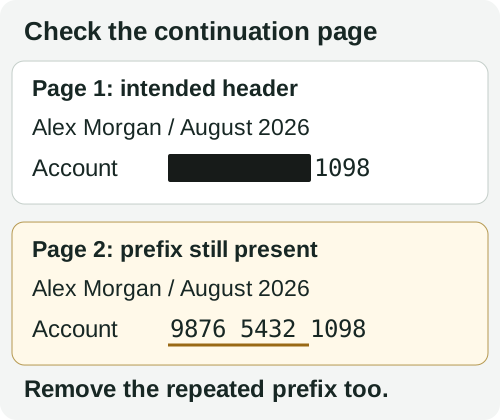
Page 2 still needs work. Apply the same account-number decision to that occurrence, then check both pages in the saved copy.
- First page: check the main account block and address. Keep the approved name, month and figures readable.
- Continuation page: inspect the header, footer and any repeated account block. Look for the same number with different spacing, such as
987654321098, rather than relying on one exact search. - Both pages: read the small print and inspect any scanned regions for repeated addresses or identifiers. Keep both pages in this example; deleting the continuation page would remove information the recipient asked to receive.
If a page is scanned, inspect the visible image as well as any searchable OCR text. The scanned PDF guide explains why a clean text search does not clear the image.
Review the saved output
Close the working document and open the saved redacted copy. Inspect every page at a readable zoom.
Check that the information requested by the recipient remains legible and that each intended removal covers the complete field. Look at repeated headers, continuation pages and small print.
Search for removed words or number fragments, and try copying text around the redacted areas into a local text editor. These checks can reveal obvious mistakes, but they do not prove that every form of hidden content has been removed. They also cannot replace visual review of scanned pages.
For the fictional example, search for the full account number, its removed prefix and 18 Example Lane, including spacing variations. A match for 1098 alone is expected because those digits were approved to remain; the same is true of Alex Morgan, August 2026 and $2,480.00. A tool finding is a prompt to compare the value and location with your instructions, not an automatic decision to delete it.
Review any hidden-information findings from your tool, check the final page count, and confirm the exact file you are about to attach.
For an additional check before sharing, open the saved copy in the free PDF redaction checker and enter the words or numbers that should be gone. It checks for remaining text and hidden data in your browser without uploading the statement. Read its findings and coverage: it does not perform OCR or read image contents, so scanned statements still need the visual review above.
The saved-PDF review guide explains what to do with a remaining match or a part of the file that could not be checked. Neither the checker nor a clean search decides whether the recipient will accept the statement.
If a removed value remains, return to the working copy, correct the missed occurrence, apply the changes and save a new output. If you removed a required field, start again from the untouched original. Recheck the entire replacement file before sharing; drawing another black rectangle over the faulty output does not remove the content underneath.
Share the reviewed copy through the recipient’s requested channel.
Frequently asked questions
Can I get a redacted bank statement from my bank?
Ask the bank first. Whether it can issue a statement for a specific period, a balance or transaction confirmation, or a document that already masks the account number varies between banks, and one of those may satisfy the recipient without any redaction. If nothing the bank offers matches the request, prepare the copy yourself from the bank-issued PDF. Do not retype, reassemble or reconstruct a statement.
Will the recipient accept a redacted bank statement?
Only the recipient can say. Some accept a copy limited to the fields they asked for; others require the complete statement or a document sent directly by the bank. Ask before you redact, and keep the untouched original so you can supply a different copy if the answer changes.
What is the difference between redacting a statement and altering it?
Redaction removes information the recipient has agreed you may withhold. Altering changes what the statement says. Do not edit amounts, dates, balances, names, the bank’s details or transaction descriptions, and do not add or delete transactions or pages the recipient asked to see. If a required figure is one you would rather not share, ask the recipient about an alternative document instead of changing the page.
Should I remove my address or only the account number?
Decide from the recipient’s request, not from a general rule. In the example above the address is removed because that recipient does not need it, while a recipient verifying your identity may ask to see it. The account number is different: apart from any last digits the recipient asked to keep, the full number should not remain anywhere in the sharing copy, including continuation pages.