
To redact an expense review pack, agree on the evidence the recipient needs, remove only the details outside that brief, and check that each expense can still be traced across the saved copies.
In this fictional example, a cost consultant needs to trace a $480 hotel charge from receipt H-028 to a quarterly travel summary. The agreed brief keeps the date, merchant, amount and expense reference visible and excludes personal contact details and reimbursement bank instructions. The DocHush steps below follow the four-page reimbursement record within that pack.
1. Agree on what the reviewer needs
Before opening the first file, confirm the recipient, purpose, required fields and delivery format. A consultant checking an expense may need different evidence from a lender confirming account ownership.
For this expense review, use the following brief:
| Document | Keep visible | Remove for this review |
|---|---|---|
| Hotel receipt | Merchant, stay dates, $480 total, receipt H-028 | Traveler’s name, personal address and card details |
| Expense claim | Expense reference, amount and review period | Personal contact details and reimbursement bank instructions |
| Statement extract | Relevant transaction, date, amount and required account identifier | Unrelated transactions and unneeded account details |
| Quarterly summary | Totals and references that connect the expense | Unrelated personal information |
Confirm any uncertain field with the recipient, including whether they accept redacted statement extracts. If the recipient needs a complete statement rather than an extract, the bank statement guide covers that copy. These choices belong to this review brief; a different audit, lending or regulatory submission may require information excluded here. The US FTC’s business security guidance supports limiting personal information and access to what the task requires; it does not define which expense fields this recipient must receive. FTC business security guidance
Check the current file requirements before starting. The image-only workflow below does not preserve searchable text, working form fields, links, original digital signatures or accessibility structure. If the recipient needs any of those, agree on a suitable alternative before preparing the pack.
2. Review the financial details in context
Keep the originals outside the delivery folder and work on copies in an approved local location. Record the source filename, reporting period and page count so each output can be traced back to the right document.
Open the reimbursement record in DocHush and use Scan to bring possible sensitive details into review. In Review, compare each candidate with the agreed brief:
- Accept the personal bank account for removal.
- Keep the $480.00 amount and receipt reference H-028.
- Check repeated payment instructions in footers and continuation pages.
- Add a manual mark for an approved removal that was not suggested.
Read around each mark before accepting it. A number may be a private account number or the expense reference the consultant needs. Keep currency symbols, decimal points and the full transaction date visible. For scanned receipts, compare OCR candidates with the page image and inspect faint digits, handwriting and stamps yourself.
3. Create the redacted review copy
Move to Redact after checking the selected regions. The bank details should be covered completely while the amount, merchant and receipt reference remain readable.
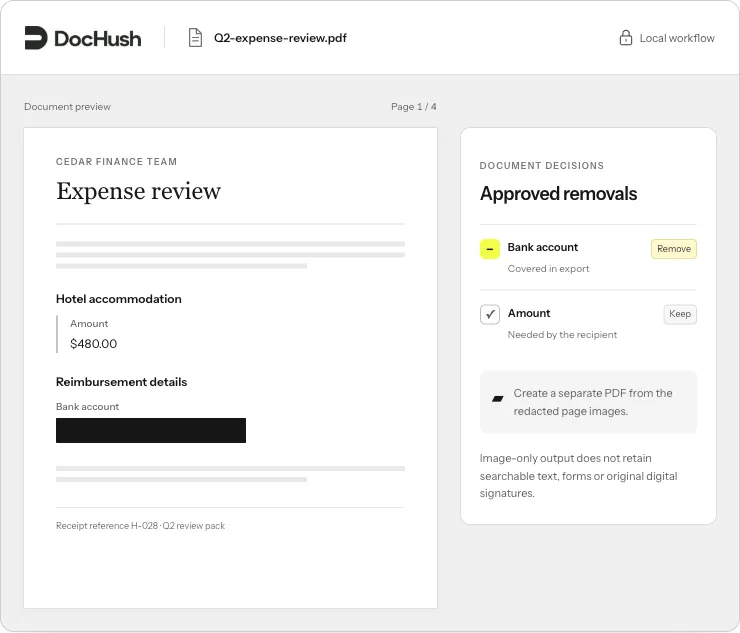
Remove the bank instructions without breaking the link between the reimbursement record and receipt H-028.
Save the output under a separate name, such as Q2-expense-review-redacted.pdf. DocHush’s image-only export workflow rebuilds the document from the redacted page images, so the outgoing copy does not carry the original text layer, comments or attachments. Details left visible on those page images still need review.
4. Check the saved copy against the receipt
Use Verify to review the output, then read the saved PDF as the consultant would. Check the removal and the evidence that remains.
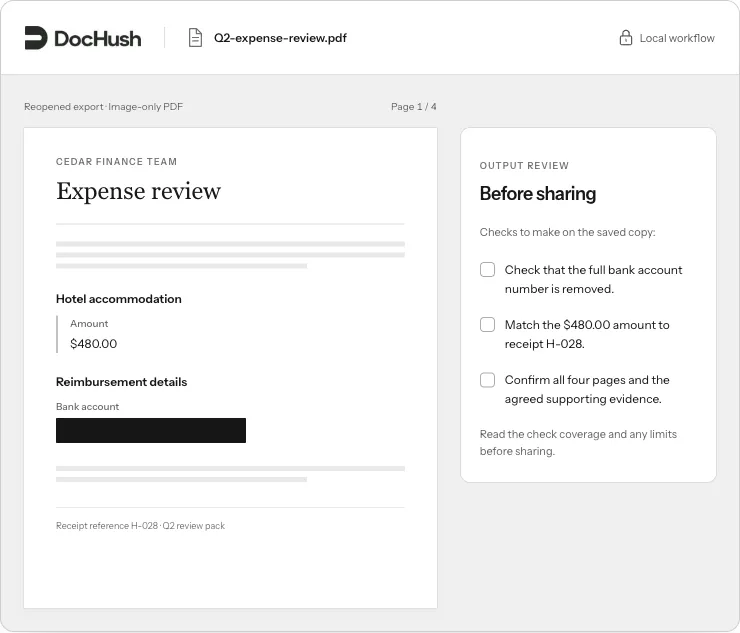
Check both sides of the decision: the bank account is removed, and the expense can still be traced.
For this record, confirm that:
- The full bank account number is removed wherever the brief requires it.
- The $480.00 amount matches receipt H-028 and the quarterly summary; the merchant, date and reference identify the same expense, rather than another charge with the same amount.
- All four pages are present, correctly oriented and legible.
- The saved file contains only the material approved for this review.
Open the saved output in a second viewer and inspect every page, including the edges of each removal and any repeated bank instructions. In an image-only PDF, a search can return no matches even when an account number remains readable in the image. A zero-match result cannot confirm that the bank details are gone.
For an additional structural and text check, use the free PDF redaction checker and read its findings and coverage. It does not redact files, perform OCR, read image contents or inspect the contents of embedded files. H-028 and $480.00 are approved to remain visible; a finding for either is not automatically an unwanted disclosure. A match for the account number requires correction, and a part of the file that could not be checked remains unresolved. The saved-PDF review guide explains these result types.
The black-box comparison files show why appearance alone is not enough: two pages can look the same while only one still contains the covered name.
5. Assemble the outgoing pack
Repeat the review for each supporting file. Before sending, trace the $480 charge through the receipt, reimbursement record and quarterly summary once more.
If the records disagree, resolve the discrepancy with the person who prepared them. Do not change amounts or hide a conflicting entry to make the documents agree. If a removal hides required evidence or misses personal details, return to the working copy or untouched original, correct the marks, export again and repeat the saved-file review.
- Put only approved outputs in the delivery folder.
- Check filenames, reporting periods, page counts and expense references.
- Keep originals and earlier working copies out of the outgoing pack.
- Record the reviewer, review date and any resolved questions.
- Confirm the recipient and delivery channel.
The consultant should be able to follow the expense without receiving unrelated personal information. If a removal is incomplete or required evidence is missing, correct the copy before sending it.